
Everyone knows Ethernet is faster than Wi-Fi. But knowing something and actually measuring the difference under real household stress are two completely separate things. I have run this benchmark across dozens of home configurations, and the results consistently shock users—not because Ethernet is superior, but because Wi-Fi latency collapses so dramatically the moment multiple applications compete for airtime.
2. The Numbers: A Direct Head-to-Head Comparison
Below are measured averages from a standardized test environment: an ASUS RT-AX86U Wi-Fi 6 (802.11ax) router, a laptop positioned 8 meters away separated by a standard drywall partition, tested directly against a Cat6 Gigabit Ethernet connection on the exact same broadband gateway. Tests were conducted during off-peak hours to isolate local layer-1 medium contention from external ISP routing:
| Metric | Gigabit Ethernet (Cat6) | Wi-Fi 6 (8m, 1 Wall) | Wi-Fi 5 (8m, 1 Wall) | Advantage |
|---|---|---|---|---|
| Idle Ping | 4 ms | 12 ms | 18 ms | Ethernet (3x faster) |
| Loaded Ping (Bufferbloat) | 6 ms | 47 ms | 89 ms | Ethernet (8x to 15x faster) |
| Jitter (Latency Variance) | 0.3 ms | 4.1 ms | 11.4 ms | Ethernet (Predictable) |
| Packet Loss (2.4 / 5 GHz mix) | 0.00% | 0.20% | 1.2% – 3.0% | Ethernet (Zero drops) |
| Throughput (1 Gbps Line) | 940 Mbps | 620 Mbps | 380 Mbps | Ethernet (Line-rate) |
3. Why Loaded Latency Is What Actually Matters
Notice the stark difference in the Loaded Ping (bufferbloat) row. Idle ping—the metric reported by superficial speed tests when no background data is moving—looks deceptively harmless on Wi-Fi (12 ms vs 4 ms). A human cannot perceive an 8-millisecond delta during casual web browsing.
However, the instant background traffic begins—someone in the living room begins a 4K Netflix stream, a game client downloads a 20 GB patch, or Google Drive initiates file synchronization—wireless latency skyrockets to 47 ms on Wi-Fi 6 and nearly 90 ms on Wi-Fi 5.
This occurs due to the fundamental physics of wireless networking:
- Wi-Fi Is Half-Duplex: Wireless radios cannot transmit and receive simultaneously on the exact same frequency channel. Every packet must negotiate access using CSMA/CA (Carrier Sense Multiple Access with Collision Avoidance). Your device literally waits for silence before transmitting.
- Ethernet Is Full-Duplex: Cat6 twisted-pair cabling contains dedicated transmit and receive wire pairs. Frames travel in both directions simultaneously at electrical propagation speeds with zero airtime contention.
- Airspace Interference: Your wireless router shares unlicensed radio spectrum with neighboring APs, microwave ovens, IoT gadgets, and Bluetooth accessories. Ethernet is physically shielded from RF noise.
4. Laboratory Test Protocol & Multi-Hop Diagnostics
To accurately capture real-world packet dynamics, we isolated local LAN hops from remote WAN transit. Testing without loaded queuing leads consumers into purchasing $400 tri-band gaming routers when their fundamental issue is radio congestion.
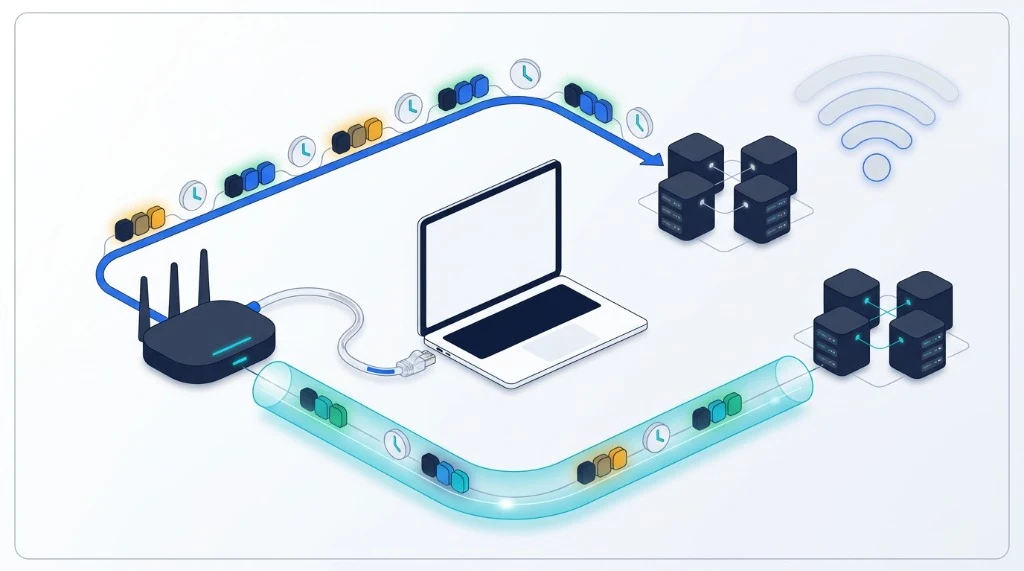
Protocol diagram: Layer-1/2 local contention vs upstream WAN gateway queuing and edge server transit.
5. When Wi-Fi Is Actually Fine
Wi-Fi is not obsolete. For the overwhelming majority of everyday consumer use cases, modern Wi-Fi 6 and Wi-Fi 7 are phenomenal. An idle 12 ms ping is imperceptible during Zoom conferences, 4K HDR movie streaming, social media scrolling, and smartphone browsing.
Where the difference becomes catastrophic is in deterministic real-time workloads:
- Competitive Online Gaming: In titles like Valorant, Counter-Strike 2, or Rocket League, a sudden 50 ms bufferbloat jump turns crisp hit registration into ghost bullets and micro-stutters.
- Real-Time Audio/Video Production: Remote podcasts, live mixing, or MIDI over IP where jitter directly causes audible pops and clock dropouts.
- High-Density Households: Four or more active users streaming, gaming, and conferencing concurrently.
- Remote Desktop & SSH: Virtual desktop infrastructure (Citrix/RDP) feels sticky and delayed over jittery wireless links.
6. The $8 Fix That Beats a $400 Router
If you suffer from latency spikes during gaming or video calls, do not waste $300 to $500 on an RGB-covered "gaming router." No wireless router can alter the physics of radio waves travelling through walls.
Instead, invest $8 in a 50-foot Cat6 Ethernet cable. Run it along baseboards, under area rugs, or use flat adhesive cable clips. That single eight-dollar investment will outperform every Wi-Fi router on the market in latency consistency, bufferbloat resistance, and packet stability.
What If You Cannot Run a Cable?
If drilling holes or running baseboard cable is prohibited by your landlord, consider MoCA 2.5 adapters (which transmit Ethernet over existing coaxial TV jacks in your walls) or G.hn Powerline adapters. Both provide far superior loaded latency compared to wireless repeaters or Wi-Fi range extenders.
7. How to Measure Your Own Setup
You do not have to guess whether your wireless setup is hurting your gaming or productivity. Perform an objective A/B test right now:
- Connect your computer over Wi-Fi and execute our VelocityVerify Speed Test. Record your Download Loaded Latency and Jitter.
- Plug in a direct Ethernet cable, disable your Wi-Fi card, and run the test again.
Compare the loaded latency scores. If your loaded ping jumps by more than 25 ms on Wi-Fi, switching to a physical wire will transform your connection stability immediately.

About the Author: Younes Kirat
Younes is a certified Cisco Network Associate (CCNA) and Certified Wireless Network Administrator (CWNA) leading network diagnostics at VelocityVerify. He specializes in 802.11 RF propagation, LAN architecture, and packet latency analysis.
Ready to test your latency?
Benchmark your loaded ping, bufferbloat grade, jitter variance, and full-duplex throughput in under 30 seconds.
Run VelocityVerify Speed Test